




Learn to Identify Mobile Parts Step by Step: Complete Guide to iPhone & Android Components
Have you ever opened a smartphone and wondered what all those small components do?
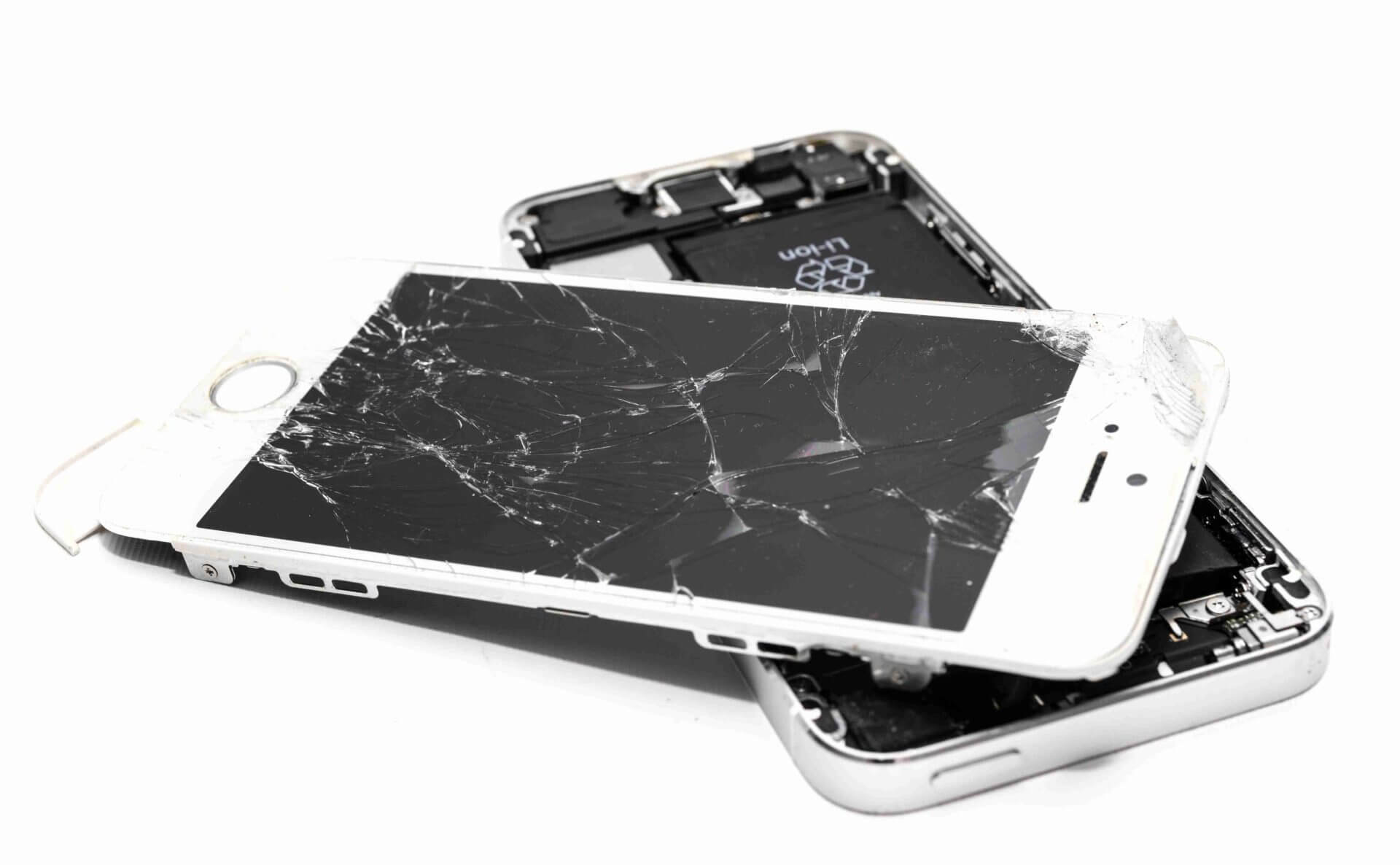
A modern smartphone may look simple from the outside, but inside it contains dozens of important parts working together. The display, battery, motherboard, cameras, charging port, speakers, microphones, sensors, antennas and many other components all have specific jobs.
If you want to learn mobile repairing, understanding the mobile parts name is one of the first things you should learn.
You do not need to become an expert immediately. Start by identifying one part at a time, understand its purpose, and then learn how different parts communicate with the motherboard.
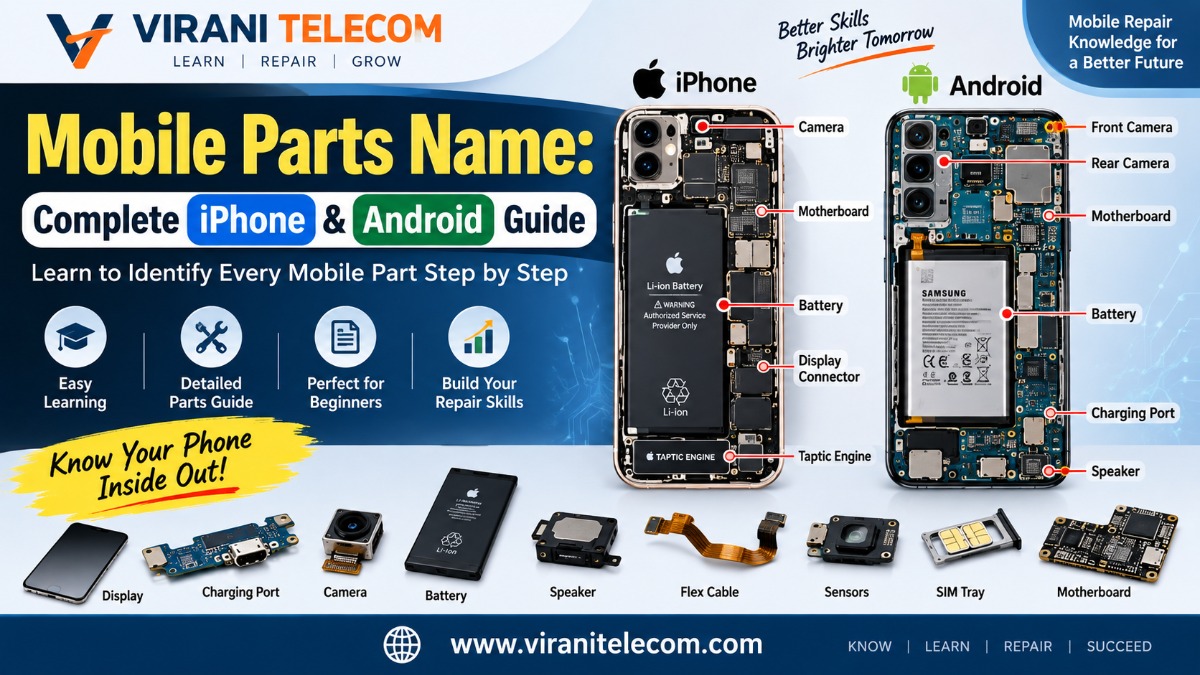
This guide from Virani Telecom will help you learn the major parts found in modern smartphones, including iPhones and Android phones, step by step.
Important: Smartphone designs differ by model and manufacturer. Not every iPhone or Android phone contains every component listed below, and some components may be integrated into a single module.
Why Should You Learn Mobile Parts Names?
Knowing the names of mobile components is important for anyone interested in mobile repair.
It helps you:
- Understand how smartphones work
- Identify damaged components
- Communicate correctly with customers
- Understand repair procedures
- Diagnose hardware problems
- Learn motherboard repair
- Choose the correct replacement part
- Understand mobile repair diagrams
- Read technical service information
- Build a strong foundation for mobile repairing
For students, learning component names before learning advanced repair techniques can make the entire subject much easier.
Mobile Parts Name: Start With the Major Components
Before learning tiny motherboard components, first understand the major modules inside a smartphone.
The main smartphone components include:
- Display
- Touchscreen digitizer
- Front glass
- Battery
- Motherboard
- Processor
- RAM
- Internal storage
- Rear camera
- Front camera
- Camera sensors
- Charging port
- USB/Lightning/USB-C connector
- Speaker
- Earpiece speaker
- Microphone
- Vibration motor
- SIM tray
- SIM reader
- Memory card slot
- Antennas
- Wi-Fi/Bluetooth components
- Cellular modem
- NFC antenna
- Wireless charging coil
- Proximity sensor
- Ambient light sensor
- Accelerometer
- Gyroscope
- Magnetometer
- Barometer
- Fingerprint sensor
- Face-recognition hardware
- Power button
- Volume buttons
- Mute/action button
- Flex cables
- Connectors
- Coaxial cables
- Flash/LED module
Now let’s understand these components properly.
1. Display
The display is one of the most visible and important parts of a smartphone.
Modern phones commonly use technologies such as:
- OLED
- AMOLED
- Super AMOLED
- LTPO OLED
- Flexible OLED
- LCD on some devices
The display produces the images, videos, text and user interface that you see.
Display Problems
Common display problems include:
- Black screen
- Lines on screen
- Flickering
- Dead pixels
- Green or pink lines
- Low brightness
- Touch-related problems
- Broken display
- Display burn-in on some OLED panels
2. Touchscreen Digitizer
The digitizer detects your finger or stylus input.
When you tap an icon, type a message or swipe through a website, the digitizer detects that interaction and sends touch information to the phone’s processing system.
In many modern smartphones, the display and digitizer are manufactured as one integrated assembly.
Common Digitizer Problems
- Touch not working
- Ghost touches
- Certain areas not responding
- Random touches
- Delayed touch response
3. Front Glass
The front glass protects the display and touch assembly.
Depending on the phone design, the front glass may be repaired separately by specialized technicians, while other repairs require replacing the complete display assembly.
A cracked glass does not always mean the underlying display panel is damaged.
4. Battery
The battery supplies electrical power to the smartphone.
Most modern smartphones use rechargeable lithium-ion or lithium-polymer battery technology.
The battery powers:
- Processor
- Display
- Cameras
- Speakers
- Sensors
- Wireless communication
- Charging system
- Motherboard
Battery Problems
Common battery-related problems include:
- Fast battery drain
- Phone shutting down
- Battery swelling
- Slow charging
- Unexpected shutdown
- Poor battery health
- Overheating
Safety Note: A swollen or physically damaged battery should not be casually punctured, bent or handled without proper safety procedures.
5. Motherboard
The motherboard is the main electronic board inside the smartphone.
It connects and controls many of the phone’s important systems.
It may also be called:
- Mainboard
- Logic board
- PCB
- Main PCB
On some iPhones, the term logic board is commonly used.
The motherboard contains or connects components responsible for:
- Processing
- Memory
- Storage
- Power management
- Cellular communication
- Wi-Fi
- Bluetooth
- Audio
- Camera communication
- Charging
- Sensors
For advanced mobile repair, understanding the motherboard is extremely important.
6. Processor / SoC
The processor is one of the most important components on the motherboard.
Modern smartphones generally use a System-on-Chip (SoC) that integrates several functions into one package.
Examples of mobile SoC families include:
- Apple Silicon
- Qualcomm Snapdragon
- MediaTek Dimensity
- Samsung Exynos
- Google Tensor
The SoC may contain processing units for:
- CPU processing
- Graphics
- AI workloads
- Image processing
- Security
- Connectivity-related functions
7. RAM
RAM stands for Random Access Memory.
It temporarily stores information required by the operating system and applications while the phone is running.
More RAM can help a phone keep more applications active, although performance depends on the complete hardware and software design.
RAM is generally located on or very close to the main processor package in modern smartphone designs.
8. Internal Storage
Internal storage stores:
- Photos
- Videos
- Applications
- Documents
- Operating system files
- User data
Modern smartphones may use technologies such as:
- UFS
- NVMe-based storage
- Manufacturer-specific storage implementations
The exact technology depends on the phone.
9. Rear Camera
The rear camera system is usually made up of one or more camera modules.
Depending on the smartphone, you may find:
- Main camera
- Ultra-wide camera
- Telephoto camera
- Periscope camera
- Macro camera
- Depth-related camera
- Monochrome camera on some older designs
Modern flagship phones can contain several cameras with different purposes.
10. Front Camera
The front camera is mainly used for:
- Selfies
- Video calls
- Face recognition
- Video recording
- Social media
- Biometric features on some phones
The exact arrangement differs between iPhone and Android models.
11. Camera Image Sensor
The camera module contains an image sensor that converts incoming light into electronic information.
Common smartphone image sensor technologies include CMOS-based sensors.
The camera system may also include:
- Lens assembly
- Image sensor
- Autofocus mechanism
- Optical image stabilization mechanism
- Aperture-related components
- Image processing electronics
12. Camera Lens
The lens focuses incoming light onto the image sensor.
A modern phone may have several lenses with different focal lengths.
For example:
- Wide
- Ultra-wide
- Telephoto
- Periscope
A scratched or damaged lens cover can affect image quality even when the camera sensor itself is working properly.
13. Camera OIS Mechanism
OIS means Optical Image Stabilization.
It physically adjusts parts of the camera module to reduce the effect of hand movement while taking photos or videos.
OIS is especially useful in:
- Low-light photography
- Zoom photography
- Video recording
Not every smartphone camera has OIS.
14. Flash / LED Module
The flash helps illuminate subjects when there is insufficient light.
Many smartphones use an LED flash system.
The flash can also be used as a flashlight.
On some iPhone models, the flash module is integrated with additional sensing or microphone-related hardware in the rear assembly.
15. Charging Port
The charging port connects the phone to:
- Charger
- Computer
- USB accessories
- Data cables
- Other compatible devices
Modern Android phones commonly use USB Type-C.
Newer iPhones also use USB-C, while older iPhone generations used Apple’s Lightning connector.
16. Charging Port Flex / Sub-Board
In many Android phones, the charging connector may be mounted on a separate daughterboard or charging sub-board.
Depending on the design, this board may also contain:
- Microphone
- Antenna contacts
- USB circuitry
- Headphone connector on older phones
- Other connectors
Some phones integrate charging circuitry directly into the main motherboard.
17. Charging IC
The charging system contains specialized power-management electronics that control battery charging.
The exact components differ by manufacturer and model.
These circuits help manage:
- Charging current
- Charging voltage
- Battery protection
- Temperature monitoring
- Charging communication
18. Power Management IC
The PMIC, or Power Management Integrated Circuit, manages power distribution throughout the phone.
It can help provide appropriate power to different sections of the smartphone.
Power-related faults can sometimes result in:
- No power
- Random shutdown
- Boot problems
- Charging problems
- Abnormal battery drain
19. Earpiece Speaker
The earpiece speaker allows you to hear the person during a normal phone call.
Modern smartphones may integrate other components around the earpiece area.
Depending on the model, this area can also contain:
- Proximity sensor
- Ambient light sensor
- Microphone-related components
- Face-recognition components
20. Loudspeaker
The bottom or main loudspeaker produces sound for:
- Music
- Videos
- Ringtones
- Speakerphone calls
- Notifications
- Games
Many modern smartphones use stereo speaker systems.
One speaker may be located near the bottom, while another audio output may come from the earpiece area.
21. Microphones
A smartphone can contain several microphones.
Different microphones may be used for:
- Phone calls
- Video recording
- Noise cancellation
- Voice commands
- Speakerphone
- Audio recording
A modern phone may have microphones positioned at the bottom, top and rear camera area.
22. Vibration Motor / Haptic Engine
The vibration system provides tactile feedback.
It is used for:
- Incoming calls
- Notifications
- Keyboard feedback
- System interactions
- Gaming
- Haptic feedback
Some premium smartphones use advanced linear haptic motors rather than traditional rotating vibration motors.
Apple uses the Taptic Engine branding for its haptic system.
23. SIM Tray
The SIM tray holds a physical SIM card in supported devices.
However, many modern phones increasingly support:
- Nano-SIM
- eSIM
- Dual SIM configurations
The exact SIM configuration varies by model and region.
24. SIM Reader
The SIM reader provides electrical contact between a physical SIM card and the phone’s communication system.
A damaged SIM reader or related circuitry can cause problems such as:
- SIM not detected
- No network
- SIM errors
However, network problems can have many causes, so diagnosis should not immediately assume that the SIM reader is faulty.
25. Antenna
A smartphone requires several antennas for wireless communication.
Depending on the model, these may include antennas for:
- Cellular network
- Wi-Fi
- Bluetooth
- GPS/GNSS
- NFC
- UWB
- Other radio systems
Antennas may be built into the frame, flex assemblies or other internal structures.
26. Cellular Modem
The cellular modem handles communication with mobile networks.
It works with other radio-frequency components to support technologies such as:
- 4G LTE
- 5G
- Other supported cellular standards
The modem implementation depends on the phone’s processor and manufacturer.
27. RF Components
RF means Radio Frequency.
Smartphones contain several components that manage wireless signals.
These may include:
- RF transceivers
- Power amplifiers
- RF switches
- Filters
- Duplexers
- Antenna switches
- Matching networks
These components are particularly important in advanced motherboard repair.
28. Wi-Fi and Bluetooth Components
Wi-Fi allows the phone to connect to wireless networks.
Bluetooth enables communication with devices such as:
- Earbuds
- Speakers
- Smartwatches
- Keyboards
- Cars
Depending on the architecture, Wi-Fi and Bluetooth functions may be integrated into a larger connectivity chipset.
29. GPS / GNSS Component
GNSS helps determine the phone’s location using satellite positioning systems.
It supports applications such as:
- Maps
- Navigation
- Location services
- Fitness tracking
- Ride-sharing applications
Modern smartphones can support multiple satellite navigation systems.
30. NFC Antenna
NFC stands for Near Field Communication.
It is used for short-range communication, including:
- Contactless payments
- NFC tags
- Device pairing
- Access systems
- Digital keys on supported devices
The NFC antenna is generally separate from the main processor but works with dedicated NFC electronics.
31. Wireless Charging Coil
Phones supporting wireless charging contain a charging coil.
It receives energy wirelessly from a compatible charging pad.
Depending on the device, the wireless charging assembly may include additional components for:
- Magnetic alignment
- Charging communication
- Thermal management
- NFC-related functionality
32. Proximity Sensor
The proximity sensor detects nearby objects.
During a phone call, it can help determine whether the phone is close to your face and prevent accidental touches.
Modern phones may use different sensing technologies, and some designs integrate the function into a larger sensor system.
33. Ambient Light Sensor
The ambient light sensor measures surrounding light.
The phone can use this information to automatically adjust screen brightness.
This helps improve:
- Outdoor visibility
- Indoor comfort
- Battery efficiency
34. Accelerometer
The accelerometer detects movement and changes in acceleration.
It is used for:
- Screen rotation
- Step tracking
- Gaming
- Motion detection
- Activity tracking
35. Gyroscope
The gyroscope detects rotational movement.
It is useful for:
- Gaming
- Augmented reality
- Camera stabilization
- Motion tracking
- Navigation applications
36. Magnetometer
The magnetometer detects magnetic fields.
It helps the smartphone determine direction and supports digital compass functions.
Maps applications can use this information to improve orientation.
37. Barometer
Some advanced smartphones include a barometer.
It measures atmospheric pressure and can help with:
- Altitude estimation
- Fitness applications
- Weather-related measurements
- Navigation features
Not every smartphone contains a barometer.
38. Fingerprint Sensor
Fingerprint sensors provide biometric authentication.
Common technologies include:
- Capacitive fingerprint sensors
- Optical in-display fingerprint sensors
- Ultrasonic fingerprint sensors
Some Android phones use an in-display fingerprint sensor.
Some iPhones use Face ID instead of a fingerprint sensor.
39. Face Recognition Hardware
Some modern smartphones use specialized hardware for facial authentication.
Apple’s Face ID system, for example, uses multiple components rather than relying only on an ordinary selfie camera.
Depending on the device, facial recognition hardware may include:
- Infrared camera
- Infrared illumination
- Dot projection system
- Supporting sensors
The exact design varies by model.
40. Depth Sensor
Some smartphones use depth-sensing technology to understand distance and three-dimensional information.
Possible technologies include:
- Time-of-Flight
- LiDAR
- Structured light
- Other depth-sensing systems
These features can support:
- AR applications
- Camera effects
- Measurement applications
- Focus assistance
- Biometric authentication on supported devices
41. LiDAR Scanner
Selected premium smartphones include LiDAR technology.
LiDAR uses light to help measure distance and create depth information.
It can assist with:
- Augmented reality
- Measuring objects
- Low-light focusing
- Spatial understanding
Not every iPhone or Android phone has LiDAR.
42. UWB Chip
UWB means Ultra-Wideband.
It enables highly precise short-range positioning on supported devices.
It can be used for:
- Device finding
- Digital car keys
- Nearby-device interaction
- Spatial awareness
- Tracking accessories
The feature is only available on supported devices.
43. Secure Element / Security Hardware
Modern smartphones contain dedicated security technologies.
These can protect:
- Encryption keys
- Biometric information
- Payment credentials
- Authentication data
- Secure boot processes
Apple devices use technologies such as the Secure Enclave, while Android manufacturers use different hardware-backed security architectures.
44. Face ID / Biometric Flex Assemblies
On supported iPhones, several small components work together for Face ID and related functions.
These assemblies can include:
- Infrared camera
- Flood illuminator
- Dot projector
- Proximity-related components
- Ambient light sensing components
This is an advanced area of smartphone hardware repair and requires model-specific knowledge.
45. Flex Cable
A flex cable is a thin flexible circuit used to connect different components.
You may find flex cables connecting:
- Display
- Battery
- Cameras
- Charging components
- Buttons
- Speakers
- Sensors
- Biometric components
Flex cables are extremely common in modern smartphones.
46. FPC Connector
FPC means Flexible Printed Circuit.
FPC connectors allow flex cables to connect to the motherboard or another board.
A damaged connector can cause a component to stop working even when the component itself is healthy.
47. Coaxial Cable
Coaxial cables are often used for radio-frequency connections.
They can connect antenna assemblies with the relevant communication circuitry.
They are commonly seen in Android smartphones and other wireless devices.
48. Daughterboard / Sub-Board
Some smartphones use multiple circuit boards.
A secondary board may be called:
- Daughterboard
- Sub-board
- Charging board
- Secondary PCB
It can contain:
- USB connector
- Microphone
- Antenna contacts
- Audio-related circuitry
- Other connectors
The exact layout depends on the phone.
49. EMI Shield
EMI means Electromagnetic Interference.
Metal shields are often placed over sensitive motherboard circuits.
They can help protect or isolate electronic sections from electromagnetic interference and provide mechanical protection.
Technicians may encounter shielded areas over:
- RF circuits
- Power circuits
- Processing sections
- Memory/storage sections
50. Thermal Management Components
Smartphones generate heat during:
- Gaming
- Video recording
- Fast charging
- Heavy processing
- 5G communication
Modern phones can use:
- Graphite sheets
- Thermal pads
- Copper components
- Vapor chambers
- Thermal interface materials
The exact cooling system varies by model.
51. Buttons and Switches
A smartphone can contain physical or mechanical controls such as:
- Power button
- Volume up button
- Volume down button
- Action button
- Mute switch
- Camera control button on some newer devices
These controls usually connect to the motherboard through switches or flex assemblies.
52. Button Flex Cable
Instead of connecting buttons directly to the motherboard with separate wires, many smartphones use a flex assembly.
A button flex may include:
- Power switch
- Volume switches
- Mute switch
- Other controls
The exact configuration depends on the phone.
53. Headphone Jack
Older Android phones and some other devices include a 3.5 mm headphone jack.
Many modern smartphones have removed it.
Audio may instead be provided through:
- USB-C
- Bluetooth
- Wireless earbuds
54. Water and Dust Protection Components
Many modern smartphones are designed with varying degrees of water and dust resistance.
Internal designs can include:
- Adhesive seals
- Gaskets
- Mesh barriers
- Sealing materials
However, opening a phone can compromise its original sealing if the device is not properly reassembled.
55. Back Glass / Rear Panel
The back of the phone may be made from:
- Glass
- Plastic
- Metal
- Composite materials
Modern premium phones often use glass rear panels.
The back panel can also work as part of the overall antenna and wireless charging design.
56. Camera Glass / Lens Cover
The external camera glass protects the camera lenses.
If the camera glass is cracked or heavily scratched, photographs may appear:
- Blurry
- Hazy
- Low contrast
- Flared
- Distorted
The camera module itself may still be functioning correctly.
57. Speaker Mesh
Small protective meshes are placed over speaker and microphone openings.
They help prevent dust and debris from entering sensitive areas.
Blocked mesh can sometimes reduce sound or microphone performance.
58. Gaskets and Adhesive
Adhesives and gaskets are used to:
- Secure components
- Hold the display
- Seal openings
- Reduce movement
- Help maintain resistance to dust and moisture
Technicians should use appropriate replacement materials during repairs.
59. Screws and Brackets
Small screws and metal brackets secure components inside the phone.
Different screws can have different:
- Lengths
- Heads
- Thread designs
- Locations
During repair, proper organization of screws is extremely important.
A wrong screw in the wrong location can potentially damage internal components.
60. Wireless Charging Magnet System
Some modern phones use magnets around the wireless charging area.
These magnets can help with:
- Charger alignment
- Magnetic accessories
- Wireless charging positioning
Apple’s MagSafe ecosystem is one well-known example.
iPhone Parts vs Android Parts
Although iPhones and Android smartphones use many of the same basic electronic principles, their internal designs can be very different.
Common Parts Found in Both
- Display
- Battery
- Motherboard
- Processor
- RAM
- Storage
- Cameras
- Speakers
- Microphones
- Sensors
- Charging system
- Antennas
- Wireless communication components
- Flex cables
- Connectors
Parts That May Differ
iPhones may include technologies such as:
- Face ID components
- Secure Enclave
- Taptic Engine
- MagSafe components
- LiDAR on selected Pro models
- UWB on supported models
Android phones may include:
- In-display fingerprint sensors
- Stylus-related hardware
- Periscope cameras
- MicroSD card slots on selected models
- Dual physical SIM configurations on some models
- Different cooling systems
- Manufacturer-specific sensors
The important lesson is simple: never assume that every phone has the same internal structure.
Step-by-Step Method to Identify Mobile Parts
If you are a beginner, do not try to memorize everything in one day.
Follow this learning method.
Step 1: Start With the Outside
Identify:
- Display
- Front camera
- Earpiece
- Buttons
- Charging port
- SIM tray
- Rear cameras
- Flash
- Microphones
- Speaker openings
Step 2: Learn the Major Internal Parts
Next, learn:
- Battery
- Motherboard
- Charging board
- Speakers
- Cameras
- Vibration motor
- Antennas
Step 3: Learn Flex Cables
Start identifying:
- Display flex
- Battery flex
- Charging flex
- Camera flex
- Power button flex
- Volume button flex
- Speaker flex
- Sensor flex
Step 4: Learn Connectors
Understand:
- FPC connectors
- Battery connectors
- Display connectors
- Camera connectors
- Coaxial connectors
Step 5: Learn Motherboard Sections
Then move to:
- CPU/SoC
- RAM
- Storage
- PMIC
- Charging IC
- Audio IC
- RF section
- Network-related components
Step 6: Study Sensors
Learn:
- Accelerometer
- Gyroscope
- Proximity sensor
- Ambient light sensor
- Magnetometer
- Barometer
- Fingerprint sensor
- Depth sensors
Step 7: Compare Different Phones
Take an iPhone and an Android phone and compare:
- Battery placement
- Camera arrangement
- Motherboard design
- Charging port
- Speaker design
- Antennas
- Flex cables
- Sensors
This is one of the best ways to remember component names.
How to Remember Mobile Parts Easily
Don’t only memorize names.
Connect each component with its job.
For example:
Battery → Power
Display → Visual output
Digitizer → Touch input
Microphone → Audio input
Speaker → Audio output
Camera → Image capture
Accelerometer → Movement
Gyroscope → Rotation
Magnetometer → Direction
Antenna → Wireless communication
Processor → Computing
Storage → Data storage
This approach makes learning much easier.
Common Mobile Parts You Should Know as a Beginner
If you are starting mobile repair training, first memorize these 20:
- Battery
- Display
- Touchscreen
- Motherboard
- Processor
- RAM
- Storage
- Charging port
- Charging IC
- Camera
- Speaker
- Microphone
- Vibration motor
- SIM reader
- Antenna
- Proximity sensor
- Ambient light sensor
- Accelerometer
- Gyroscope
- Flex cable
Once these become familiar, move toward advanced motherboard components.
Advanced Mobile Parts Every Technician Should Eventually Learn
For advanced mobile hardware repair, you should gradually understand:
- CPU/SoC
- RAM
- NAND/UFS storage
- PMIC
- Charging IC
- USB controller
- Audio IC
- RF transceiver
- Power amplifier
- RF switch
- Filters
- Coils
- Capacitors
- Resistors
- Diodes
- Transistors
- Inductors
- Crystals/oscillators
- ESD protection components
- MOSFETs
- FPC connectors
- Test points
- Antenna switches
- Signal lines
- Power rails
- Ground connections
These are more advanced than simply identifying a replaceable phone part.
Why Part Identification Matters in Mobile Repair
Imagine a customer says:
“My phone is not charging.”
A beginner may immediately think the charging port is damaged.
An experienced technician knows that several components could be responsible.
The problem could involve:
- Charging port
- Charging flex
- USB circuitry
- Charging IC
- Battery
- Battery connector
- PMIC
- Software
- Cable
- Charger
- Corrosion
- Motherboard damage
That is why part identification is only the first step.
The next step is learning how to diagnose the actual fault.
Practical Tips for Mobile Repair Students
1. Use Real Phones for Learning
Old or non-working phones can be useful for understanding physical component placement.
2. Take Photos Before Disassembly
Photos can help you remember where components and connectors belong.
3. Label Components
When learning, write the name of each component on a diagram or printed image.
4. Learn One Phone Model at a Time
Do not try to memorize every smartphone motherboard immediately.
5. Understand Function, Not Just Names
Knowing that a component is called a PMIC is less useful if you do not understand its role in power management.
6. Never Force Connectors
Modern smartphone connectors are tiny and can be damaged easily.
7. Learn Safety First
Battery handling, ESD protection, heat management and proper tools are important parts of professional repair.
Mobile Parts Name Cheat Sheet
| Part | Main Function |
|---|---|
| Display | Shows images and information |
| Digitizer | Detects touch |
| Battery | Supplies power |
| Motherboard | Main electronic board |
| Processor | Performs computing |
| RAM | Temporary working memory |
| Storage | Stores data |
| Camera | Captures images/video |
| Speaker | Produces sound |
| Microphone | Captures sound |
| Charging Port | Power/data connection |
| PMIC | Manages power |
| Charging IC | Controls charging functions |
| Antenna | Wireless communication |
| Vibration Motor | Provides vibration/haptic feedback |
| Proximity Sensor | Detects nearby objects |
| Accelerometer | Detects acceleration/movement |
| Gyroscope | Detects rotation |
| Magnetometer | Detects magnetic direction |
| Barometer | Measures air pressure |
| NFC Antenna | Short-range communication |
| Wireless Charging Coil | Receives wireless power |
| Fingerprint Sensor | Biometric authentication |
| Flex Cable | Connects components |
| FPC Connector | Connects flex circuits |
| RF Components | Process wireless signals |
| SIM Reader | Communicates with physical SIM |
| Sub-board | Secondary circuit board |
Key Takeaways
- Learning mobile parts name is an essential first step in mobile repair.
- Modern smartphones contain many more components than just a battery, display and motherboard.
- iPhones and Android phones share many basic components but can have very different internal designs.
- Some components are integrated into larger modules.
- Not every smartphone contains every sensor or feature.
- Understanding the function of a component is more useful than memorizing its name alone.
- Beginners should start with major components before studying motherboard-level components.
- Advanced technicians should eventually learn ICs, passive components, RF sections, power circuits and signal paths.
- Proper safety procedures are essential when working with smartphone batteries and electronic components.
Conclusion
Learning smartphone hardware does not have to be complicated.
Start with the parts you can easily identify: the display, battery, cameras, speakers, microphone, charging port and motherboard. Once you become comfortable with these components, move toward flex cables, sensors, connectors and then motherboard-level components.
The more phones you study, the easier it becomes to recognize different designs.
Whether you want to repair iPhones, Android smartphones or build a career as a mobile technician, understanding the mobile parts name gives you a strong foundation.
At Virani Telecom, we believe practical knowledge is the key to becoming confident in mobile repair. Don’t just memorize component names—understand what each part does, how it connects with other components, and what symptoms can appear when it fails.
Dahisar – HO
Shop No 2D Bldg No.2, Labh Darshan, D Wing, Chhatrapati Shivaji Rd, near Subway, Avdhut Nagar, Dahisar East, Mumbai, Maharashtra 400068
Borivali
Shop No.5, Thakkar Shopping Centre, Gyan Nagar, Mhatre Wadi, Borivali West, Mumbai, Maharashtra 400092
Kandivali
Shop No 103, Ground Floor, Raghuleela Mega Mall, Bus Depot, near Poisar, Kandivali, Jai Bhim Sanjay Nagar, Kandivali West, Mumbai, Maharashtra 400067
Want to Learn Mobile Repair Professionally?
Ready to move beyond simply knowing the names of mobile components?
Join mobile repair training with Virani Telecom and learn smartphone hardware through practical, step-by-step training.
Learn about:
- Mobile hardware components
- Smartphone disassembly
- Component identification
- Mobile troubleshooting
- iPhone and Android hardware
- Motherboard fundamentals
- Charging and power systems
- Practical repair techniques
Start learning mobile repair today and turn your technical interest into a valuable professional skill.
Contact Virani Telecom to learn more about mobile repair training and available courses.
Frequently Asked Questions
1. What are the most important mobile parts to learn first?
Beginners should start with the display, battery, motherboard, charging port, camera, speaker, microphone, vibration motor, SIM reader, antenna and basic sensors.
2. Are iPhone and Android mobile parts the same?
Many basic components perform similar functions, but their designs, connectors, placement and technologies can be very different. Always identify the exact phone model before ordering or replacing a component.
3. What is the most important part of a mobile phone?
There is no single component that performs every function. The motherboard, processor, memory, power system, display and battery all play important roles and work together.
4. What should I learn after identifying mobile parts?
After learning component names, you should study their functions, common faults, testing methods, circuit diagrams and safe repair procedures. Advanced learners can then move toward motherboard-level diagnosis.
5. How many parts are inside a smartphone?
There is no fixed number. A modern smartphone can contain dozens of major modules and many additional electronic components such as resistors, capacitors, ICs, coils, filters, connectors and protection components.
6. Can I learn mobile parts without previous repair experience?
Yes. Component identification is a good starting point for beginners. Start with major parts, learn what each component does, and gradually move toward motherboard-level hardware.

Chetan
September 22, 2026Sahi hai
Wow 👌
Virani Telecom and Institute
September 22, 2026Very good article, informative.